Menu
Table Of Contents

monday.com CRM Implementation in the GCC: How Professional Services Firms Build a Pipeline That Converts
A field guide from Meta Lean, monday.com Platinum Partner and CRM Specialist Partner in the UAE.
The short answer: A monday.com CRM implementation converts more revenue when the system mirrors your actual sales process instead of forcing your team into a generic template. For GCC operations leaders, the payoff is not new software but a standardized, visible, and forecastable pipeline. A typical implementation can take around four to six weeks, depending on workflow complexity, data migration, integrations, and the number of users.
For an operations leader at a Dubai consultancy, law firm, or advisory practice, the CRM question is rarely “which tool.” It is “why can I still not see, with confidence, what will close this quarter.” Deals live in inboxes. Forecasts are built from memory. Two partners describe the same pipeline stage three different ways. The tool is not the problem. The absence of a standardized, enforced process behind the tool is.
This guide lays out how Meta Lean implements monday.com CRM as an operations system, not just a sales tracker. It covers the method we use across GCC engagements, how monday.com compares with HubSpot and Zoho for a professional services firm, realistic implementation considerations, and the questions decision-makers ask us most. For a practical look at day-to-day CRM setup, see How to Use monday CRM for Sales: A Step-by-Step Guide for Faster Deals.
Why does CRM implementation stall for GCC operations teams?
In our experience, CRM projects rarely stall because the software lacks features. They stall when the process is unclear or adoption is weak. Three patterns show up repeatedly in the firms we assess:
- Process drift. Every partner or team lead runs their own version of the sales cycle, so pipeline data is not comparable and reporting is manual.
- Tool sprawl. Leads sit in spreadsheets, follow-ups in WhatsApp, contracts in email, and nothing reconciles into a single source of truth.
- Forecast blindness. Leadership cannot answer “what is the weighted value of the pipeline and when will it land” without a week of chasing.
These are operations problems before they are software problems. That is the lens Meta Lean brings as a monday.com Platinum Partner: we treat the CRM as the operating layer for your revenue process, and we standardize that process first.
Our position, stated plainly: A CRM should mirror how your firm already wins work, then remove the manual steps that slow it down. It should not reshape your business around a vendor’s default template.
If you are still deciding what the implementation should include, our monday.com CRM implementation services page outlines the broader setup, automation, integration, and support approach.
What makes monday.com the right fit for professional services firms in the GCC?
monday.com CRM is built on the monday Work OS, which means the same platform that runs your sales pipeline can run onboarding, delivery, and account management. For a professional services firm, where the sale and the delivery are tightly linked, that continuity matters more than it does for a pure product business.
- Process flexibility without IT tickets. You can model an advisory sales cycle such as Inquiry, Scoping Call, Proposal Sent, Negotiation, and Engagement Signed, then change it as the firm evolves.
- One workspace across the client lifecycle. A qualified lead can become a deal, then an engagement, then a renewal, while Emails and Activities keeps relevant communication and next steps tied to the right record. Once a client is live, their service requests can run on the same platform with monday Service, as covered in our monday Service UAE guide.
- AI-powered workflows without losing human control. monday CRM now includes named AI capabilities such as the AI Lead Agent, Lead Sourcing Agent, Calling Agent, Meeting Prep Agent, and Pipeline Agent. These can support specific tasks such as sourcing and enriching prospects, qualifying leads, preparing reps for meetings, and surfacing deal risk. Availability depends on the current plan, feature release, and account configuration, so validate the capability before making it a workflow dependency.
A regional example: a Dubai management consultancy running partner-led business development can standardize how every partner logs an opportunity, so leadership finally reads one pipeline instead of five. An Abu Dhabi advisory firm can automate the handoff from proposal accepted to engagement kickoff, closing the gap where deals used to stall between sales and delivery.
What is the Lean Pipeline Method?
The Lean Pipeline Method is Meta Lean’s five-stage approach to implementing monday.com CRM as an operations system. It is designed to standardize the revenue process first, then configure the tool to enforce it, so the CRM raises forecast accuracy and pipeline visibility rather than just storing contacts.
The five stages are Map, Architect, Migrate, Automate, and Activate. Each one has a defined output, so leadership can see progress at every checkpoint.
Stage 1: How do you map your revenue process?
Before touching the software, we value-stream your actual sales cycle. We document every stage a deal passes through, who owns it, what has to be true to advance, and where deals currently stall. For a professional services firm, that can surface a hidden bottleneck, often around proposal or scoping, where days quietly leak.
Output: an agreed, standardized pipeline definition that every partner and rep will use.
Stage 2: How should you architect your boards?
We build the monday.com board structure to match the mapped process, not the other way around. monday CRM provides Leads, Contacts, Deals, and Accounts boards that can be customized to your stages and fields. Connect Boards can link related records so a partner can see the wider client relationship.
Output: a configured board architecture with the pipeline view, deal stages, and the fields your firm actually forecasts from, such as engagement value, practice area, probability, and expected close.
Stage 3: How do you migrate and qualify existing pipeline data?
We import current leads and deals from spreadsheets, web forms, or an existing CRM, cleaning and deduplicating on the way in so you do not carry old mess into a new system. We then apply a qualification status to every record, so only vetted opportunities sit in the active pipeline. Historical context is preserved where the source data supports it.
Output: a clean, qualified pipeline in monday.com, with legacy history retained where required and reporting that starts from a reliable baseline.
Stage 4: What should you automate first?
We remove the manual handoffs that cause delay and dropped follow-ups. Practical first automations include alerting a partner when a high-value lead has gone untouched for 24 hours, notifying delivery when an engagement is signed, and creating a contact record when a lead is qualified. AI can also support this stage: the AI Lead Agent can source, add, and enrich prospects against an ideal customer profile; the Pipeline Agent can surface deal risk; and the Meeting Prep Agent can prepare reps with relevant customer context. Some AI capabilities are in beta or subject to plan and regional availability, so confirm the current status before publishing or promising a specific agent to a client.
Output: live automations and, where appropriate, configured AI capabilities that cut manual admin and protect follow-up discipline.
Stage 5: How do you activate the system and keep it improving?
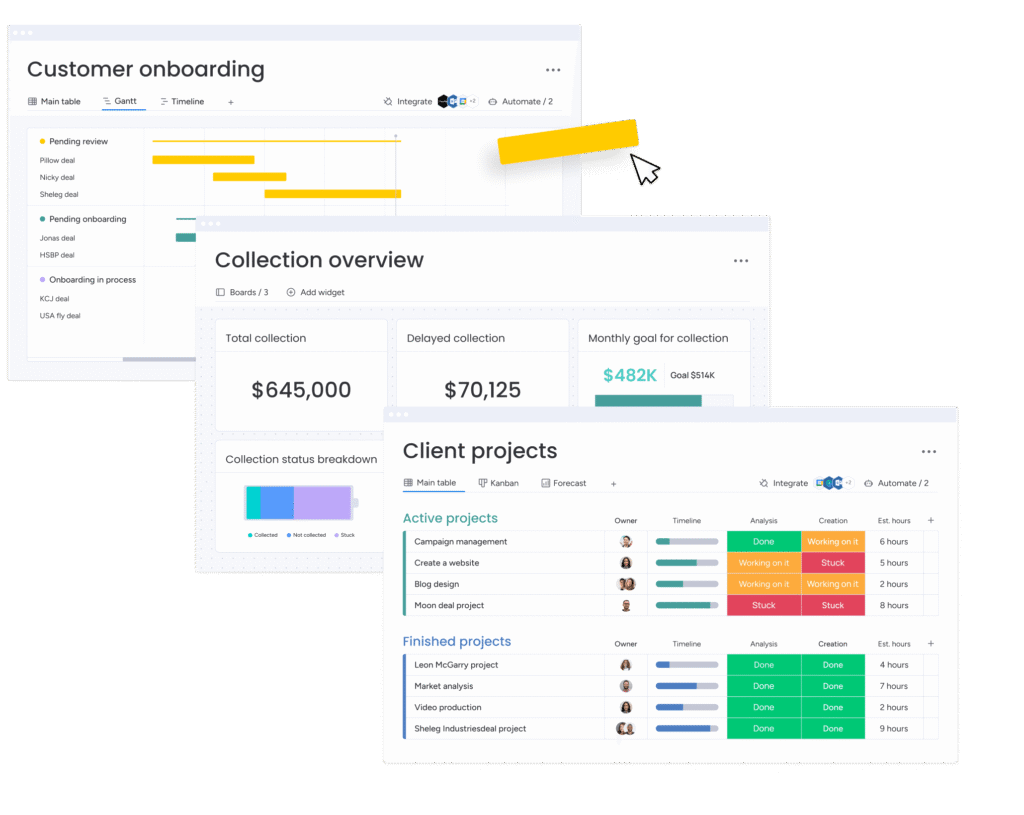
We run training for partners, reps, and managers, connect email and calendar through Emails and Activities where appropriate, and build the leadership dashboard around pipeline value, weighted forecast, win rate, and average days per stage. Then we go live, gather feedback, and refine the system against real usage.
Output: an adopted system, a live forecasting dashboard, and an optimization loop so the CRM improves against real data rather than assumptions.
What does the Lean Pipeline Method look like in practice?
Case study: The Pearl Gates. The Pearl Gates, a Gulf real estate firm, engaged Meta Lean to replace disconnected, manual processes with a single monday CRM system. On the sales side we built a custom lead intake form that categorizes each lead as rental, sale, or investment, auto-assigns it to the right rep by category or region, and moves it through defined pipeline stages from site visit to offer sent to contract signed. Conditional approval cycles trigger based on deal value and stage, commission tracking releases only after the required approvals, and sub-item automations confirm that contracts and documents are in place before a deal can advance. A management dashboard brought active leads, conversion ratios, performance by rep, and commissions into one view. The outcome was clearer lead-to-sale tracking, accountability at every stage, and end-to-end visibility the previous setup could not provide. The same monday.com build later extended into their creative studio and HR onboarding workflows.
This is the Lean Pipeline Method in practice: standardize the process, then configure the CRM to enforce it. The same principle appears in our monday.com implementation services and broader consulting work.
How does monday.com CRM compare with HubSpot and Zoho?
All three are capable CRMs. They serve different priorities. For a GCC professional services firm, monday.com is particularly strong when the priority is process flexibility and continuity across the client lifecycle. HubSpot is a strong choice when deep native marketing automation is the priority, while Zoho can appeal to cost-conscious teams that are comfortable with a more modular ecosystem. For a deeper side-by-side comparison, see our monday CRM vs HubSpot CRM comparison.
| Attribute | monday.com CRM | HubSpot | Zoho CRM |
|---|---|---|---|
| Core model | Sales pipeline on monday Work OS, with delivery and renewals on the same platform | CRM with broader sales and marketing hubs | Modular CRM ecosystem |
| Ease of use | Visual boards and configurable workflows | Clean interface with a broad feature set | Flexible, but configuration can require more effort |
| Customization | Strong workflow and field flexibility | Highly capable, with some advanced capabilities tied to higher tiers | Flexible and modular |
| Automation and AI | Automations plus named AI capabilities such as AI Lead Agent, Lead Sourcing Agent, Calling Agent, Meeting Prep Agent, and Pipeline Agent | Strong automation and AI capabilities | Zia AI and automation capabilities vary by edition |
| Marketing automation | Available, but not the primary differentiator | A major strength | Available through the broader Zoho ecosystem |
| Best fit | Operations-led professional services firms wanting a tailored client-lifecycle process | Teams prioritizing native marketing automation | Cost-conscious teams wanting a broad modular suite |
What does monday.com CRM cost?
Current monday.com CRM list pricing shown on the official pricing page is $12 per seat/month for Basic, $17 for Standard, and $28 for Pro when billed annually; Ultimate is custom priced. Pricing can vary by billing country, team size, taxes, promotions, and commercial terms, so use the live pricing page when preparing a proposal. The Standard and Pro tiers currently include AI capabilities, while specific agent access can depend on the plan and feature availability.
For a deeper pricing and feature comparison, see monday.com’s current CRM pricing.
How long does implementation take?
A typical implementation can take around four to six weeks, depending on workflow complexity, data migration, integrations, number of users, and the level of customization required. The rollout normally moves from process mapping and board architecture into migration and automation, followed by training, go-live, and a refinement period.
Implementation cost is separate from the monday.com subscription. It is scoped around workflow complexity, data, integrations, training, and the level of customization required. If you are evaluating implementation partners, compare the actual scope of work rather than the software subscription alone.
Frequently Asked Questions
If leadership cannot produce a reliable weighted forecast in minutes, a structured CRM can create significant operational value. The goal is not contact storage. It is a standardized process every partner follows, so the pipeline becomes comparable, visible, and forecastable. You can start with a lean setup and expand as the firm grows.
monday.com is easy to start. Getting a CRM that reflects your process, supports reliable reporting, and is actually adopted is the harder part. A monday.com Platinum Partner can help standardize the process first, configure the platform around it, and support adoption.
A typical implementation can take around four to six weeks, depending on workflow complexity, migration, integrations, and users. Discovery and setup come first, followed by automation and training, then go-live and refinement.
Yes. monday.com supports integrations with tools such as Gmail and Outlook, along with broader integration options and APIs. The exact integration method and capabilities depend on the tool and current monday.com setup.
Current monday CRM materials name capabilities including the AI Lead Agent, Lead Sourcing Agent, Calling Agent, Meeting Prep Agent, and Pipeline Agent. For example, the AI Lead Agent can source, add, and enrich prospects against an ideal customer profile, while the Pipeline Agent can help identify deal risk. Availability can vary by plan and feature status, including beta availability, so confirm the current account-level access
It depends on your priority. For a GCC professional services firm that wants a tailored, standardized pipeline across the client lifecycle, monday.com can be a strong fit. If deep marketing automation is the main requirement, HubSpot may be stronger. If cost and a broad modular ecosystem are the priority, Zoho may be worth considering.
Use operational KPIs such as average days from qualified to closed, weighted forecast accuracy, win rate by practice area, and follow-up response time. Dashboards can make these metrics visible so leadership manages the pipeline using current data.
Ongoing support can include training new joiners, refining automations, building executive dashboards, and extending monday.com into delivery and account management as the firm's needs evolve. Meta Lean also provides broader monday.com consultancy and training support.