Are you overwhelmed choosing between monday CRM and HubSpot CRM for your
business needs? Many teams report confusion due to the different platform focuses and
integration capabilities, because monday CRM serves flexible workflows while HubSpot
excels in sales and marketing automation. Research shows HubSpot offers a powerful free
plan and extensive app marketplace, whereas monday CRM provides intuitive visual tools
and cost-friendly entry pricing. This article gives a complete guide to pricing, workflow
support, automation, key differences, and CRM vs HubSpot comparison so you can
choose the right CRM solution with confidence.
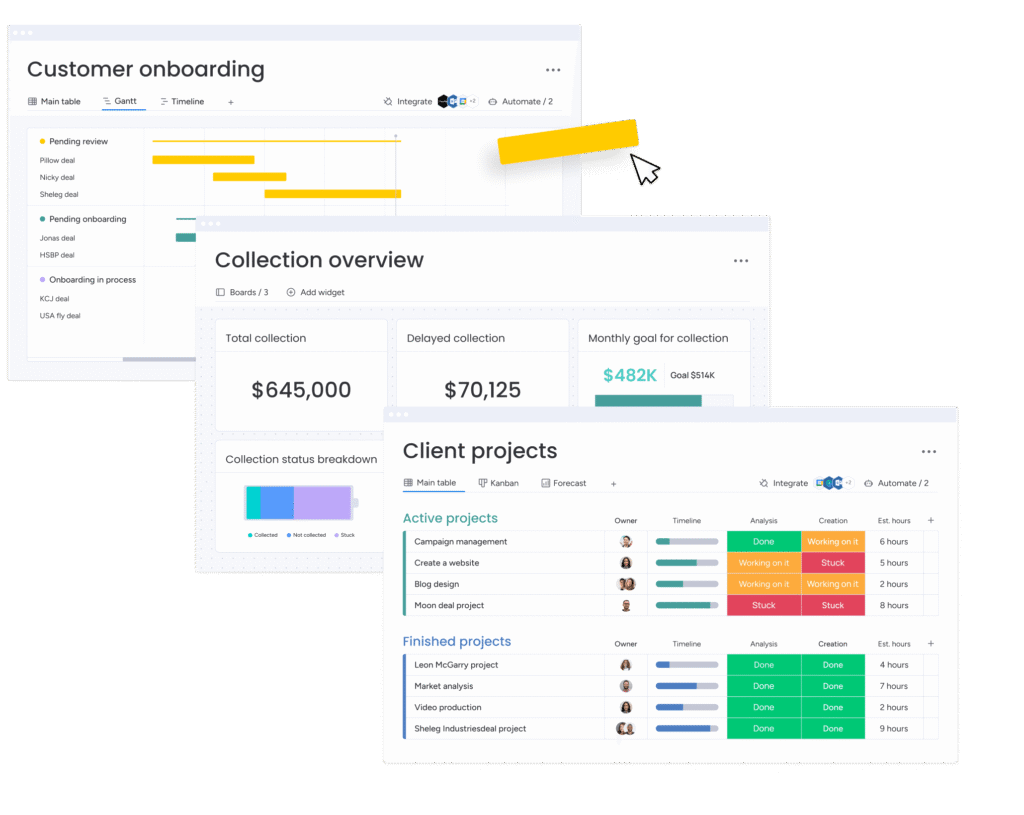
monday.com offers flexibility through visual task boards, customizable fields, and
drag-and-drop stages. HubSpot provides structured sales pipelines, native marketing
automation, detailed reports, and strong analytics. Choosing between them often depends
on whether teams want visual process control or built-in marketing and sales automation.
HubSpot delivers deeper sales forecasting, ROI tracking, and marketing automation
capabilities, while monday CRM prioritizes simple pipeline customization and workflow
visualization. HubSpot supports more integrations and data reporting tools, whereas monday
CRM supports team task management.
To get the most from HubSpot CRM, align sales pipelines with contact and lead data, use
built-in assignment automation, and include email tracking. This approach helps teams
centralize customer information and supports clearer communication and productivity.
You might choose HubSpot when your focus includes marketing automation, campaign
tracking, and scalable sales workflows. Its free plan supports unlimited users, helping small
teams start without upfront costs, and its integrations grow as your needs expand.
HubSpot CRM provides deal pipelines, email tracking, advanced analytics, and AI-assisted
insights. Its sales, marketing, and service tools enable teams to track engagement, automate
workflows, and forecast revenue effectively, especially for inbound-focused businesses.
HubSpot CRM supports over 1,000 native integrations, connecting with email platforms,
productivity apps, e-commerce systems, and analytics tools. This broad ecosystem ensures
that teams can sync data across multiple systems efficiently.
monday CRM presents a visual, flexible CRM platform built on customizable boards and
fields that match team workflows. It integrates project tracking with lead and deal
management, letting teams automate routine actions. monday CRM supports integrations
with calendars, messaging, and productivity apps, helping unify work management and CRM
tasks.
To use monday CRM, start by customizing pipelines to reflect your sales process, add leads
and contacts, and set up simple automation “recipes” to notify teams or update records
automatically.
monday CRM features include customizable pipelines, lead and contact management,
automated updates, visual dashboards, and workflow templates. These features support
teams that want CRM and work management in one environment.
monday CRM integrates with over 200 applications including Slack, Outlook, Google
Workspace, and Zapier connectors, helping teams link communications, file storage, and
productivity tools into CRM processes.
Comparing CRM vs HubSpot emphasizes how HubSpot extends basic customer relationship
management to a broader suite of sales, marketing tools, analytics, and service features. A
general CRM may handle contacts and deals, but HubSpot’s platform enables end-to-end
customer engagement tracking and automation across functions.
CRM vs monday CRM shows that a basic CRM might offer contact management and deal
stages, while monday CRM blends CRM functionality with visual project planning and
customizable workflows for broader team needs.
Choose CRM when you want simple contact and deal management. Choose monday CRM
when you want CRM plus flexible visual workflows and project management in one shared
platform.
Integration plays a central role in comparing these platforms. HubSpot’s extensive
ecosystem offers native connections with sales, marketing, analytics, and service apps.
monday CRM also integrates with core tools like email, calendars, files, and messaging
platforms, though its catalog is smaller than HubSpot’s extensive offerings. Both platforms
support API and connectors to sync data efficiently.
monday CRM supports over 200 direct integrations and additional connections through
Zapier or Make, helping unify workflow, communication, and productivity tools with CRM
data.
HubSpot CRM supports more than 1,000 integrations across tools like Gmail, Slack,
accounting apps, and messaging platforms, enabling seamless connection of sales,
marketing, and service systems.
Workflow integration between CRM systems and other platforms lets teams automate tasks
and sync updates across tools. HubSpot’s deeper automation makes multi-step workflows
easier, while monday CRM simplifies everyday triggers for clearer notification flows.
Platform features determine how well a CRM supports business goals. HubSpot emphasizes
structured sales pipelines, strong automation, predictive insights, and marketing tools.
monday CRM emphasizes visual customization, flexible boards, and no-code automations
that adapt to specific team processes across tasks and deals.
HubSpot offers traditional CRM structures with tabbed layouts, timelines, and clearly defined
record types, while monday CRM gives teams drag-and-drop boards and customizable
columns tailored to their work style.
HubSpot’s workflow tools support complex triggers, sequences, and automated lead
nurturing, whereas monday CRM’s automation recipes handle common actions like record
updates and notifications.
HubSpot’s tools connect sales and marketing tightly with lead scoring, campaign automation,
and analytics. monday CRM supports sales task automation and visual pipelines that help
teams stay organized and manage deals collaboratively.
Pricing is a crucial comparison point. HubSpot CRM offers a truly free tier with core tools and
scalable paid plans that bundle hubs for marketing, sales, and analytics. monday CRM uses
per-seat pricing with no permanent free CRM tier, requiring a minimum number of users.
small teams may find HubSpot’s free plan advantageous, while larger teams can benefit
from monday CRM’s predictable pricing.
HubSpot CRM offers a free plan with unlimited users and core CRM tools. Paid tiers start at
basic “Starter” plans and scale into professional and enterprise levels that include more
advanced automation, analytics, and service tools.
monday CRM pricing typically starts at around $12 per user/month billed annually, with
Standard and Pro tiers adding enhanced automation, reporting, and integrations. There’s no
free CRM tier, but a free trial exists.
HubSpot’s free tier offers excellent starting value for small teams focused on inbound sales
and marketing, whereas monday CRM delivers cost-effective visual workflows and
collaboration tools for teams that want CRM plus task management.
Choosing the right CRM should match your team’s workflow, sales process, need for
marketing automation, and budget. HubSpot often suits businesses that require deep
marketing, analytics, and automated engagement, whereas monday CRM works better for
teams that prioritize customizable visual workflows and integration with broader business
tasks.
Consider ease of setup, customization, integration support, mobile access, and whether the
CRM must support sales, marketing, or service functions before committing.
HubSpot is generally best for comprehensive sales and marketing alignment, while monday
CRM fits teams seeking a flexible, visual CRM with practical task and pipeline management.