Menu
Table Of Contents
How to use monday.com project management
Many teams lose track of tasks, deadlines, and responsibilities while managing complex project workflows. Research indicates that project management software improves visibility, collaboration, and resource planning across teams. Platforms like monday.com centralize project data, automate updates, and track timelines effectively. Therefore, many organizations use monday.com for project management to manage project boards, dashboards, and automation workflows. This guide explains how to use monday.com project management tools effectively. It covers project boards, templates, timelines, dashboards, automation, and portfolio management for efficient project execution.
Project Management Fundamentals and the Role of monday.com
Project management focuses on organizing tasks, resources, and timelines to achieve clear project deliverables efficiently. Modern project management principles emphasize collaboration, structured workflows, and measurable outcomes. Therefore, teams adopt management tools like monday.com work os to manage project data, coordinate project phases, and support successful project management across different project management frameworks.
What Project Management Means for Modern Teams
Modern project management ensures project teams coordinate activities, track project progress, and maintain clear communication effectively. Additionally, project managers monitor project status, manage workload, and align tasks with overall project scope. Consequently, structured project management workflows help every project progress efficiently from planning through project execution.
Types of Project Management Approaches Used by Teams
Teams apply different project management frameworks depending on project needs and organizational goals. For instance, agile, waterfall, and hybrid models represent common types of project management. Moreover, each framework defines project phases, task management methods, and resource management strategies for efficient project execution.
Key Project Management Roles in a Team Structure
Project management roles ensure structured collaboration within the project team and clear accountability for deliverables.
Key characteristics include:
- Project manager role oversees project timelines, resource management, and project progress.
- Management professionals coordinate task management and communication across stakeholders.
- Project teams support project execution through defined responsibilities and project management skills.
Why Teams Need Project Management Software
Project management software supports effective project management by centralizing project data, tasks, and communication. Additionally, tools like monday work management enable teams to track project timelines, analyze project performance, and manage workload effectively. Consequently, management platforms improve project visibility and support proactive project management decisions.
Why Teams Use monday.com for Project Management
Many organizations use monday.com for project management because the platform integrates planning, collaboration, and reporting capabilities. Furthermore, monday work management supports efficient project workflows and centralized project data management. Therefore, project teams manage any project, monitor project health, and coordinate project execution through a unified work os environment.
How monday.com Supports Successful Project Management
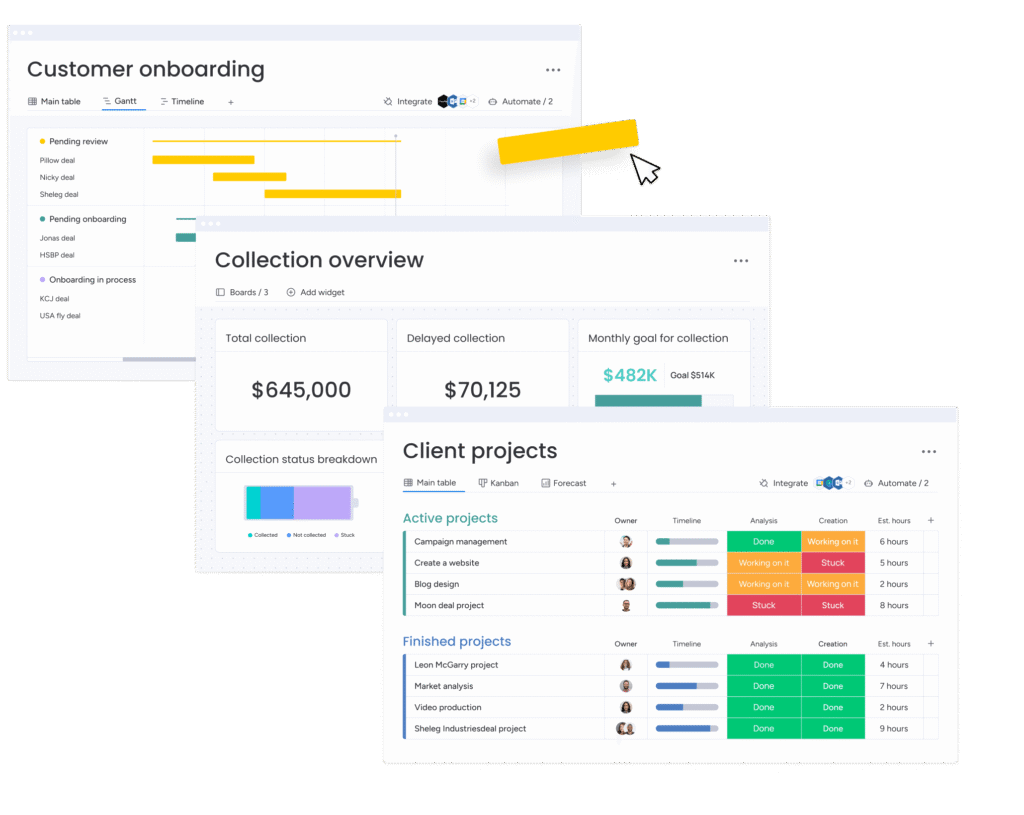
monday.com project management supports project success by combining task management, automation, and real-time collaboration. Additionally, teams visualize project timelines using gantt charts and timeline views. Consequently, project managers monitor project progress, identify delays, and maintain structured project management workflows efficiently.
Benefits of Using monday.com for Project Management
Benefits include:
- monday work management offers customizable templates supporting efficient project planning.
- Dashboards display project data for insights and high-level project performance monitoring.
- Automation reduces repetitive updates while improving overall project execution efficiency.
- Workload view helps project managers balance team assignments across different projects.
How monday work management Improves Collaboration
monday work management supports collaboration by enabling project teams to share updates, files, and discussions directly within project boards. Additionally, team members track project updates and coordinate tasks simultaneously. Consequently, collaborative features reduce communication gaps and improve transparency across project management workflows.
Managing Project Data in a Centralized Work OS
The monday.com work os centralizes project data, tasks, and reporting into a single management platform. Moreover, dashboards consolidate data from multiple monday.com boards, offering high-level project data visibility. Therefore, project managers analyze project health and make informed decisions using real-time project insights.
Setting Up monday.com Project Management for Your Team
Teams begin using monday work management by creating structured project boards and defining project management workflows. Additionally, project managers organize tasks, project timelines, and responsibilities within customizable templates. Consequently, the management platform helps project teams coordinate activities efficiently while maintaining clear project scope and measurable project deliverables.
Creating Your First monday.com Project Management Board
Project managers start by building monday.com boards that organize tasks, owners, timelines, and project status. Additionally, boards support different columns for task management, priority, and project data. Consequently, teams track project progress and manage specific project activities clearly.
Selecting the Right Template for Project Management
Templates simplify project planning by providing structured layouts for project phases, tasks, and responsibilities.
Key benefits include:
- Customizable templates support different project management frameworks and workflows.
- Creating templated project boards accelerates planning for the next project.
Templates ensure consistent project management principles across multiple projects.
Organizing Tasks and Key Project Activities
Project managers organize tasks into groups representing project phases and deliverables. Additionally, teams assign deadlines, priorities, and owners for every project activity. Consequently, structured task management ensures every project remains aligned with the defined project plan.
Assigning Team Members and Project Management Roles
Project managers assign responsibilities through people columns within monday.com boards. Additionally, the platform helps track workload distribution and resource management across projects. Consequently, clear project management roles ensure project teams maintain accountability and complete project deliverables efficiently.
Building a Project Management Workflow in monday.com
Project management workflows define how tasks move from planning to completion within each project phase. monday work management enables teams to design customizable workflows, automate updates, and track project progress simultaneously. Therefore, structured workflows support efficient project management while maintaining visibility across every project activity.
Designing an Effective Project Management Workflow
Effective project management workflows align tasks, resources, and communication across the project team. Additionally, monday work management enables automated updates and structured task transitions. Consequently, teams maintain efficient project execution while tracking project status throughout each project phase.
Structuring Workflow Stages for Any Project
Project managers divide workflows into stages representing planning, execution, monitoring, and closure. Additionally, workflow stages clarify project scope and key project deliverables. Consequently, teams manage different project activities systematically across the entire project duration.
Tracking Tasks with Status, Priority, and Ownership
Task tracking helps project managers monitor project status and identify potential delays early. Additionally, monday.com boards allow status updates, priorities, and owner assignments. Consequently, teams maintain accountability and improve project progress visibility across multiple tasks.
Managing Dependencies Between Tasks
Dependencies help teams coordinate tasks that rely on earlier project activities. Additionally, gantt charts highlight relationships between tasks and project timelines. Consequently, project managers control project execution and reduce scheduling conflicts effectively.
Managing Project Timelines and Schedules
Project timelines represent structured schedules that guide project teams through planning and execution phases. monday.com project management enables teams to visualize timelines, milestones, and dependencies clearly. Consequently, project managers monitor project duration, adjust schedules, and maintain consistent progress across different project activities.
Creating a Timeline for Project Tasks
Project managers define project timelines by assigning start dates, deadlines, and dependencies to tasks. Additionally, timeline views display scheduling relationships across project phases. Consequently, teams track project progress and maintain clear visibility of upcoming deadlines.
Using Gantt and Timeline Views to Track Progress
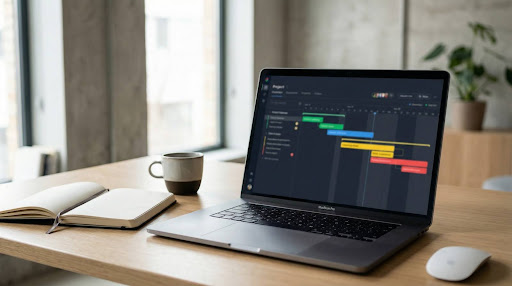
Gantt charts visually display task dependencies, milestones, and project timelines within a structured timeline. Additionally, gantt views help project managers identify scheduling risks and resource conflicts. Consequently, teams maintain proactive project management across multiple projects.
Monitoring Milestones for Key Project Deliverables
Milestones represent significant checkpoints within project timelines and project phases. Additionally, project managers track milestone completion to evaluate project progress. Consequently, teams maintain alignment with project scope and ensure timely delivery of key project deliverables.
Keeping Projects on Schedule with Clear Deadlines
Clear deadlines ensure project teams maintain accountability and complete tasks within the planned project duration. Additionally, automated reminders notify stakeholders about upcoming tasks. Consequently, project managers maintain control project execution and prevent scheduling delays.
Using Dashboards to Monitor Project Performance
Dashboards in monday work management provide centralized visibility into project data, timelines, and team workload. Additionally, project managers analyze high-level project data through customizable widgets and reports. Consequently, dashboards help leaders evaluate project health and support data-driven project management decisions.
Creating a monday.com Dashboard for Project Tracking
Project managers create dashboards by connecting multiple project boards and selecting relevant widgets. Additionally, dashboards consolidate project data into a unified view. Consequently, teams track project progress, project status, and resource allocation efficiently.
Visualizing Project Data with Widgets and Reports
Widgets convert raw project data into charts, numbers, and timeline visuals for analysis. Additionally, dashboard widgets track workload, budgets, and task completion metrics. Consequently, project managers analyze project performance quickly and accurately.
Tracking Workload, Budget, and Team Progress
Workload view displays team assignments across projects, helping managers balance resource distribution effectively. Additionally, dashboards track project timelines, budgets, and task completion rates. Consequently, managers maintain efficient resource management and monitor project progress continuously.
Making Data-Driven Decisions with Real-Time Metrics
Real-time metrics allow project managers to analyze project status and evaluate project performance quickly. Additionally, dashboards combine data from several boards to provide high-level project insights. Consequently, teams adjust strategies and improve overall project success.
Automating Tasks and Processes in monday.com
Automation improves efficiency by reducing repetitive administrative work within project management workflows. monday work management offers automation recipes that trigger updates, notifications, and status changes automatically. Consequently, project teams maintain efficient workflows while focusing on high-priority project activities.
Setting Up Automation to Reduce Manual Work
Project managers configure automation rules to update project status and notify team members automatically. Additionally, automation ensures tasks move through workflow stages efficiently. Consequently, teams maintain consistent project management workflows with minimal manual effort.
Using Automation Recipes for Task Updates
Automation recipes trigger actions based on predefined conditions within project boards. Additionally, recipes automatically update task assignments and project timelines. Consequently, project managers maintain consistent project updates without repetitive administrative tasks.
Triggering Notifications and Status Changes Automatically
Automated notifications inform project teams about task updates, deadline changes, and workflow transitions. Additionally, status updates occur automatically after specific conditions. Consequently, project teams remain informed and maintain clear communication throughout project execution.
Improving Workflow Efficiency with Automation
Automation significantly improves workflow efficiency by reducing delays and administrative tasks. Additionally, project managers configure automation to streamline approvals and task transitions. Consequently, teams maintain proactive project management and achieve successful project management outcomes.
Managing Multiple Projects with Portfolio Management
Portfolio management allows organizations to monitor multiple projects simultaneously within a single management platform. monday work management offers portfolio dashboards that track project progress, risks, and resource allocation. Consequently, managers analyze project health and maintain strategic alignment across programs.
Building a Project Portfolio in monday.com
Project managers organize several projects within a portfolio management structure. Additionally, portfolios aggregate data from multiple monday.com boards. Consequently, leaders review high-level project data and coordinate program management efficiently.
Tracking Portfolio Performance Across Teams
Portfolio dashboards display project progress, resource allocation, and performance indicators across departments. Additionally, stakeholders monitor portfolio performance through centralized reports. Consequently, organizations maintain consistent oversight of large-scale initiatives.
Connecting Project Boards to Portfolio Dashboards
Project boards connect directly with portfolio dashboards to display project updates automatically. Additionally, dashboard widgets gather project data from several boards simultaneously. Consequently, managers analyze project performance and identify potential risks earlier.
Monitoring Progress Across Multiple Projects
Portfolio management enables project managers to track progress across different projects simultaneously. Additionally, dashboards highlight project timelines, workload distribution, and milestones. Consequently, leaders ensure every project aligns with strategic organizational goals.
Best Practices to Control Project Execution in monday.com
Successful project management requires structured planning, clear communication, and consistent monitoring of project performance. monday work management supports these practices through customizable boards, dashboards, and workflow automation. Consequently, teams maintain control project execution and ensure efficient project completion.
Standardizing Processes with Templates
Templates standardize workflows, task structures, and reporting formats across projects.
Key benefits include:
- Customizable templates ensure consistent project planning across different project types.
- Plan ahead with customizable templates for future project management needs.
- Templates simplify project setup and accelerate efficient project execution.
Maintaining Clear Communication Across Teams
Effective communication ensures project teams remain aligned with project scope and project deliverables. Additionally, monday.com boards support comments, file sharing, and updates. Consequently, teams coordinate project tasks efficiently and maintain transparency.
Tracking Key Project Metrics and Risks
Project managers monitor project metrics such as deadlines, resource utilization, and project health indicators. Additionally, dashboards provide project data for insights and performance analysis. Consequently, managers implement proactive project management strategies.
Improving Collaboration for Successful Project Management
Collaboration tools help project teams coordinate tasks, share updates, and maintain project progress. Additionally, monday work management enables cross-department collaboration through shared boards. Consequently, organizations achieve successful project management and improved project outcomes.
Tips for Teams That Use monday.com for Project Management
Teams improve productivity by applying structured workflows, automation, and dashboard monitoring within monday work management. Additionally, the management platform helps teams analyze project data and coordinate tasks effectively. Consequently, organizations manage any project efficiently and maintain continuous project progress.
How Teams Manage Any Project Efficiently
Efficient teams organize project boards, assign responsibilities, and monitor project progress consistently. Additionally, dashboards and gantt charts provide clear visibility into project timelines. Consequently, teams maintain effective project management across different project types.
Structuring Boards for Different Types of Project Management
Project managers design monday.com boards according to project scope and project management frameworks. Additionally, boards support columns for tasks, timelines, and ownership. Consequently, teams manage different project workflows within a structured management platform.
Optimizing Workflow and Project Data Organization
Teams organize project data using structured columns, workflow stages, and dashboards. Additionally, dashboards display high-level project data for insights and reporting. Consequently, project managers analyze project performance and make informed management decisions.
Scaling Project Management with monday work management
Organizations scale operations by using monday work management across departments and projects. Additionally, the platform supports portfolio management, automation, and customizable dashboards. Consequently, businesses maintain robust project management and deliver efficient project outcomes across every project.
Conclusion
Effective project management requires structured workflows, clear timelines, and consistent monitoring of project progress. Using monday.com helps project managers organize project boards, automate updates, and analyze project data through dashboards. Additionally, features such as Gantt charts, workload view, and customizable templates support proactive project management. These tools help teams manage every project phase, track project health, and ensure successful project execution. When teams use monday.com for project management correctly, they improve collaboration and project success. How will you organize your next project using monday work management?
Frequently Asked Questions
monday.com project management helps teams organize tasks, timelines, and workflows efficiently. It centralizes project data, dashboards, and automation within one management platform.
Beginners create a project board, add tasks, assign team members, and set timelines. Templates and dashboards simplify project planning and progress tracking.
Yes, monday work management supports task management, automation, dashboards, and collaboration. It helps teams manage project progress and track project status effectively.
Users create monday.com boards, add task columns, assign owners, and define timelines. Boards organize project data and support structured project management workflows.
Yes, monday.com provides Gantt charts to visualize project schedules a