
Choosing between monday.com vs ClickUp is a common question for teams trying to improve their workflow. Both tools are popular and powerful, but they help you work in different ways.
Monday.com feels more visual and organized. ClickUp gives you more customization and flexibility. So the best choice really depends on how your team likes to plan work, manage tasks and track progress.
Many businesses also want to understand how these tools support integrations, automation and everyday productivity. This is where topics like best monday.com integrations for business naturally come in. They help highlight how real teams use Monday.com to simplify work and save time.
This guide gives you a clean, simple and honest comparison so you can decide which tool fits your team better.
| Category | Monday.com | ClickUp |
|---|---|---|
| Ease of Use | Very intuitive and guided. Ideal for teams who want a simple and visual workspace. | Powerful but overwhelming for beginners. Requires more setup time. |
| Interface & Design | Clean, colorful and structured. Easy to navigate. | Feature-heavy interface with deep customization options. |
| Automation | Strong rule-based automations that are reliable and easy to create. | More flexibility in automation paths but setup can become complex. |
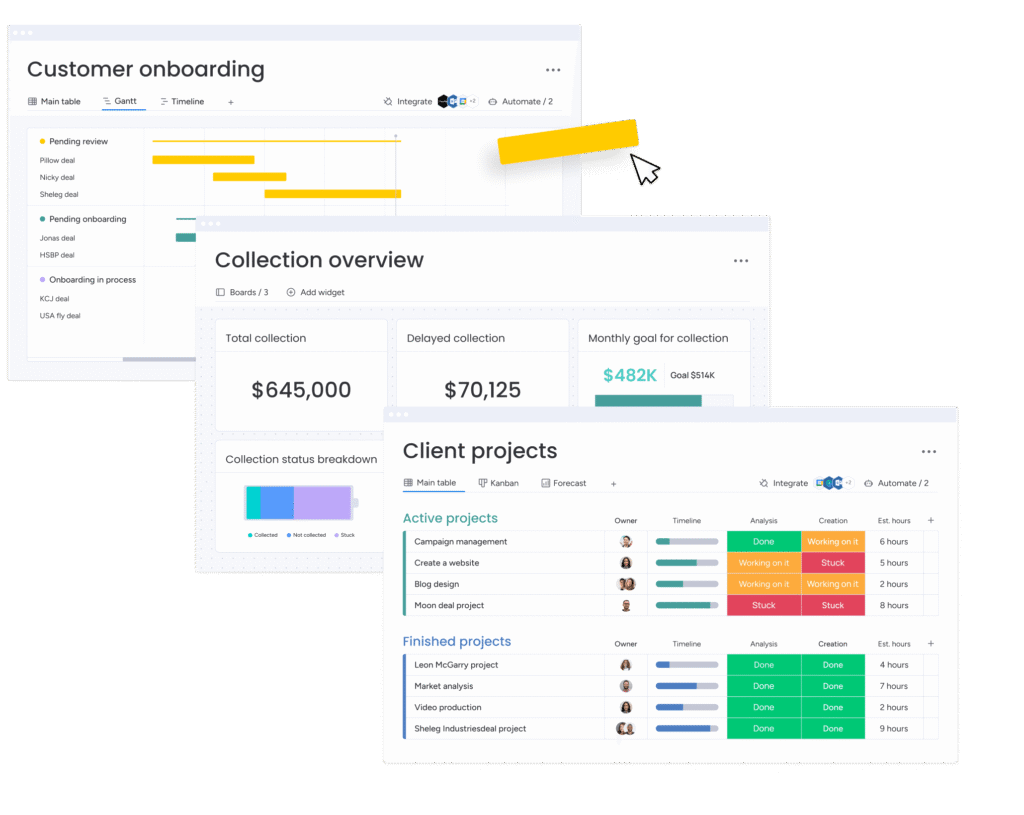
| Task & Project Views | Boards, timelines, charts and dashboards with a polished design. | Many views available including lists, boards, docs and mind maps. |
| Customization | Balanced customization that keeps things organized. | Extreme customization for teams who want full control of their workspace. |
| Integrations | Works smoothly with essential business tools. Great for structured workflows and predictable systems. | Large library of integrations with room for advanced setups. |
| AI Features | Built-in AI for summaries, task suggestions and workflow insights. | AI assistant for writing, summarizing and idea generation. |
| LLM Integration | Supports external LLMs through API and workflow builders. | Also supports external LLMs using AI blocks and API calls. |
| Team Collaboration | Very strong for cross-team visibility and structured planning. | Good for teams who prefer flexible documentation inside the tool. |
| Best For | Teams that want clarity, structure and smooth onboarding. | Teams that want deep customization and an all-in-one workspace. |
| Pricing | Slightly higher starting plans depending on the team size. | Generally more budget friendly at the entry level. |
Monday.com is designed for teams that want a clean and structured workspace. The layout feels simple even when you are managing large projects. Boards, columns and color coding help everyone understand what is happening without any training.
One of the biggest strengths of monday.com is how guided everything feels. Teams can plan work, track progress and collaborate without dealing with too many complex settings. It fits well for businesses that want clarity and a system that stays organized as the team grows.
Automation is a major advantage here. Monday.com offers reliable rule based automations that save time and reduce manual work. These automations are easy to set up and help maintain a predictable workflow which many teams prefer.
Monday.com also supports integrations that connect with tools used in daily operations. This makes it easier for teams to bring tasks, communication and reporting into one place. A lot of businesses explore ideas like monday.com productivity hacks to get even more value from their setup.
Although the platform is simple, it still offers enough flexibility for most teams. The structure keeps everything clean which is especially useful for new users or teams that want consistency.
ClickUp is built for teams that want a highly customizable workspace. It gives you many options to shape tasks, views and workflows exactly the way you like. This flexibility is great for power users or teams that enjoy building their own structure from scratch.
The platform offers a wide range of views including lists, boards, docs and even mind maps. This variety helps teams keep everything in one place which is one of ClickUp’s biggest appeals. It works well for businesses that prefer deep customization over a guided layout.
ClickUp also includes an AI assistant that helps with writing, summaries and quick idea generation. It provides helpful shortcuts for content heavy teams, especially marketing and operations.
While the flexibility is a strength, it can also feel a little heavy for new users. Some teams may find the setup process longer compared to Monday.com. This is one reason many businesses reach out to certified partners like Meta Lean when they want a more structured and predictable workflow on Monday.com.
ClickUp is still a strong tool for teams who want everything in a single platform and don’t mind exploring multiple settings to get the experience they want.
ClickUp is made for teams that want full flexibility. You can customize tasks, views and workflows exactly how you prefer. This makes it great for power users.
It also offers many view types including lists, boards, docs and mind maps. Teams that want an all-in-one workspace usually enjoy this variety.
ClickUp includes an AI assistant for writing support and quick summaries. It helps marketing and content teams work faster.
The only challenge is that ClickUp can feel heavy for beginners. New users often need more time to learn the system.
Monday.com is easier for new teams because the layout is simple and guided. ClickUp offers more control but beginners may feel overwhelmed.
Monday.com looks clean and structured which helps teams stay organized. ClickUp gives you many layout options and deep customization for advanced users.
Monday.com keeps views simple with boards, timelines and dashboards. ClickUp offers many views including lists, docs and mind maps which suit teams that want everything in one place.
Monday.com provides stable rule based automations that are quick to set up. ClickUp gives you more flexibility in automation paths but the setup often requires extra time.
Monday.com lets you customize in a controlled and tidy way. ClickUp allows extreme customization for teams that want full control over their workspace.
Monday.com works smoothly with business tools and stays stable across workflows. It is especially helpful when teams look for structured setups. ClickUp offers a large variety of integrations for teams that want many options.
Monday.com includes built-in AI for quick summaries and task suggestions. ClickUp offers AI for writing, summaries and idea generation inside the platform.
Both tools support external LLMs through their APIs. This helps teams automate smarter workflows without depending on built in models.
Monday.com includes simple AI features that create summaries and give quick suggestions inside tasks. ClickUp offers AI for writing, outlining and helping teams generate ideas faster. Both tools use AI to reduce manual work but the style of assistance is slightly different.
Monday.com focuses on structured workflows. Teams can connect AI outputs through API based automations and keep everything stable and predictable. ClickUp allows flexible setups for teams that want to experiment with different automation flows.
Both platforms support external LLMs like GPT and Claude through their APIs. This helps teams create custom actions such as summarizing updates, extracting details from messages or generating content automatically. The quality of these workflows usually depends on how clean the workspace is which is why monday.com often performs better in structured team environments.
Monday.com works well for teams that want reliable systems with clear rules. ClickUp fits teams that enjoy customizing and testing different AI driven tasks. The choice depends on how stable or flexible you want your workflows to be.
AI workflows work best when the system is clean and structured. Monday.com supports this really well because its boards and fields follow a simple pattern. This makes AI summaries, task updates and API based automations more accurate.
ClickUp is better for teams that want to test different AI ideas or build custom AI powered workflows. It offers more freedom but sometimes the workspace becomes cluttered which affects consistency.
Teams that want reliable automation usually prefer monday.com. Teams that enjoy experimenting with new AI powered methods often lean toward ClickUp. The choice depends on how stable or flexible your everyday workflow needs to be.
Many GCC businesses prefer tools that stay structured and easy to maintain as the team grows. Monday.com works well here because it keeps everything organized and simple to manage even with large teams. Training is also easier which helps companies move faster.
ClickUp can also work for GCC teams that want heavy customization and an all in one workspace. Some businesses appreciate the flexibility but it may require more time to set up and manage.
Companies in the region often choose monday.com when they want predictable systems and steady workflows. This is one reason many teams work with partners like Meta Lean for setup and automation support.
Both tools are strong but they solve problems in different ways.
Choose monday.com if you want a simple and structured workspace that stays organized as your team grows. It works well for businesses that need clear systems, predictable workflows and easy onboarding.
Choose ClickUp if your team prefers full customization and wants an all in one platform. It gives you more control but requires extra time to set up and manage.
Many businesses still choose Monday.com when they want clear processes and smooth collaboration, especially when looking to improve sales workflows and learn how to use monday crm for sales in a practical way.
Yes. Monday.com feels more visual and guided which makes it easier for new teams. ClickUp offers more features but can feel heavy for beginners.
Monday.com provides simple and reliable automations. ClickUp has more flexible paths but setup usually takes longer.
Monday.com works better for structured AI tasks. ClickUp suits teams that enjoy trying different AI ideas and custom actions.
ClickUp usually offers a lower starting price, while Monday.com may cost slightly more depending on your plan.
Monday.com is easier to scale because the workspace stays clean and organized. ClickUp is suitable if customization is your top priority.
If you want guidance choosing the right platform or need help building smarter workflows, Meta Lean is here to support you. We are an official Monday.com partner and help teams set up integrations, automations and productivity systems that save time and improve performance.
Reach out for a free workflow review and see how your team can work better.